
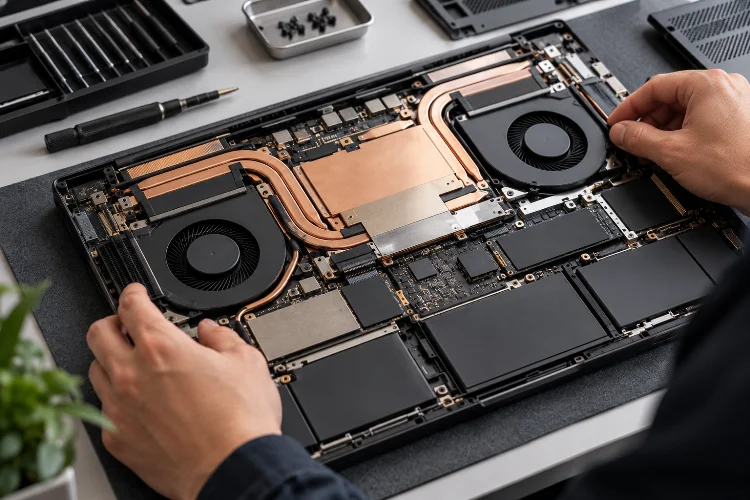
A laptop can have a powerful CPU, fast GPU, and plenty of memory, yet still perform worse than another machine with nearly identical specifications. One of the biggest reasons is hidden underneath the keyboard: the cooling system.
Understanding how cooling architecture affects laptop speed and reliability is important because modern processors constantly adjust their frequencies according to power consumption and temperature.
They can run very fast for short periods, but maintaining that speed becomes difficult when heat builds faster than the laptop can remove it.
This is why cooling is not simply about keeping the chassis comfortable to touch. It determines how long processors can maintain high clock speeds, how loudly the fans need to run, and how consistently a laptop behaves during gaming, video rendering, software compilation, or AI workloads.
Microsoft distinguishes between active cooling, such as fans, and passive cooling, where performance is reduced to lower heat output.
The better the thermal architecture, the more freedom a laptop has to maintain useful performance without constantly slowing itself down.
Heat Is One of the Main Limits on Laptop Performance
Modern CPUs and GPUs can increase their clock speeds automatically when more performance is required. The problem is that higher frequencies generally require more electrical power, and that additional energy eventually becomes heat.
During a short task, this is rarely a problem.
Opening an application or processing a quick photo edit may finish before internal temperatures rise significantly. A thirty-minute game or lengthy video render is different because the processor produces heat continuously.
Intel explains that Turbo Boost frequencies are opportunistic rather than frequencies designed to remain active indefinitely. If processor temperatures become too high, built-in protection can reduce clock speed through throttling.
This creates the difference between peak performance and sustained performance.
A laptop might look extremely fast during the first benchmark run but slow down once the cooling system becomes saturated. Another machine may have slightly lower initial scores but maintain nearly the same speed throughout a long workload.
For real users, the second behaviour is often more useful.
Heat Pipes and Vapor Chambers Move Heat Away From Processors
The first major job of a laptop cooling system is transferring heat away from concentrated hotspots such as the CPU and GPU.
Many laptops use heat pipes. These sealed tubes contain working fluid that helps move thermal energy from the processor area toward larger heatsinks positioned near exhaust vents.
Higher-performance machines increasingly use vapor chambers.
A vapor chamber works on a similar physical principle but spreads heat across a larger flat surface. That additional contact area can help cool several components simultaneously.
ASUS, for example, uses vapor chambers in some current ROG laptops to cover the CPU, GPU, and nearby power-delivery components. Its Zephyrus G16 combines vapor-chamber cooling with multiple fans and redesigned exhaust vents to balance temperatures and noise.
That does not mean vapor chambers are automatically superior in every laptop.
A well-designed heat-pipe system can perform extremely well, while a poorly implemented vapor chamber can still struggle. Surface area, heatsink capacity, airflow, thermal interfaces, and chassis design all matter.
The complete architecture is more important than the name of one cooling component.
Fans and Airflow Determine How Quickly Heat Leaves the Laptop
Moving heat away from the processor is only half the problem. That thermal energy eventually has to leave the laptop.
Fans pull cooler air into the chassis, move it across internal components and heatsinks, then push warmer air through exhaust vents.
The size, number, and placement of fans can dramatically influence thermal capacity.
Gaming laptops often have two or even three fans because they must cool both powerful CPUs and dedicated GPUs. Some designs also provide additional airflow around memory, voltage regulators, and SSDs.
ASUS’s current Strix designs, for example, combine multiple fans, large rear heatsinks, and extensive intake and exhaust areas to increase heat dissipation during sustained workloads.
Airflow routing matters too.
If hot exhaust air is immediately pulled back into the intake, cooling efficiency falls. Larger rear exhausts can help move heat away from the machine instead of recirculating it.
A seemingly small chassis detail can therefore affect real performace during a long gaming session.
Fan Curves Create a Trade-Off Between Speed and Noise
Laptop cooling is controlled partly by software.
Manufacturers define fan curves that determine how aggressively fans respond as component temperatures increase.
A quiet mode might allow the CPU to become warmer before increasing fan speed. This keeps the laptop pleasant during office work but may reduce performance during demanding tasks.
A performance or turbo profile usually does the opposite.
Fans begin spinning faster and earlier, giving the cooling system more capacity to remove heat. The processor may then maintain higher power levels for longer, but acoustic levels increase.
NVIDIA’s WhisperMode illustrates how modern laptops increasingly coordinate CPU temperature, GPU temperature, fan speed, and power consumption rather than controlling each element completely seperately.
Its Max-Q technologies also dynamically manage CPU and GPU resources to balance efficiency and performance.
There is therefore no perfect fan curve for every situation.
Someone writing documents may prefer an almost silent machine. A gamer wearing headphones might happily accept louder fans in exchange for higher frame rates.
Good thermal tuning provides sensible options instead of forcing one behaviour on every workload.
Thermal Throttling Protects the Laptop
Throttling sometimes gets treated like a design failure, but the mechanism itself is an important safety feature.
Microsoft’s thermal-management framework distinguishes between active cooling and passive cooling. Active cooling can engage fans, while passive cooling can reduce the performance of processors or other components to decrease power consumption and heat generation.
Intel similarly describes throttling as a mechanism that reduces processor clock speed when temperatures exceed the appropriate thermal limits.
Without these protections, processors could continue generating heat until temperatures became unsafe.
The real concern is how often aggressive throttling occurs.
If a laptop repeatedly reaches its thermal ceiling during normal gaming or professional workloads, frame rates may fluctuate and rendering speeds can become inconsistent.
A better cooling architecture delays or reduces the need for heavy throttling.
That is why sustained benchmark testing tells you much more about thermal design than a single short performance test.
CPU and GPU Cooling Must Work as One System
High-performance laptops face a particularly difficult problem because the CPU and GPU may both produce substantial heat at the same time.
During gaming, for example, the CPU handles game logic, physics, background processes, and data preparation while the GPU renders graphics.
Both compete for thermal and electrical headroom.
NVIDIA Dynamic Boost can automatically distribute power between the CPU, GPU, and graphics memory according to workload requirements.
Cooling architecture influences how much freedom systems like this actually have.
If the thermal solution is already operating near its limit, giving the GPU more power could simply create additional heat and trigger throttling. A laptop with greater cooling capacity has more room to increase performance where it is needed.
This is one reason large gaming laptops can sometimes outperform much thinner systems containing nominally similar components.
The silicon might be similar. The thermal environment around it is not.
Vent Placement and Ambient Temperature Matter More Than Expected
Even an excellent cooling system can struggle if its intake vents are blocked.
Many laptops draw air through openings on the bottom panel. Placing them on beds, pillows, blankets, or other soft surfaces can restrict airflow and force fans to work harder.
Apple recommends using its laptops on stable surfaces with good ventilation and specifies an ambient operating range of 10°C to 35°C for current Mac laptops.
Ambient temperature matters because cooling relies on transferring heat into the surrounding air.
A laptop in a cool room has more thermal headroom than the same machine operating in a very hot environment.
Dust can also reduce airflow over time.
Accumulated debris may restrict intake openings, coat fan blades, or become trapped around heatsinks. ASUS specifically notes that dust buildup can trap heat and reduce long-term cooling performace, which is why some of its current laptops include intake dust filters.
Good cooling therefore involves both initial engineering and long-term maintenance.
Cooling Can Influence Long-Term Reliability
A well-managed thermal system also matters beyond benchmark scores.
Laptop components are designed to operate safely across specified temperature ranges, and automatic controls prevent processors from simply overheating without intervention. Still, repeatedly operating a machine under heavy thermal stress makes cooling quality particularly important.
The most obvious reliability benefit is stability.
A cooling system that maintains predictable temperatures reduces the likelihood of repeated thermal shutdowns, severe throttling, or unusually high fan activity.
Heat can also affect neighbouring components.
SSDs, voltage regulators, memory modules, batteries, and other electronics share a relatively compact enclosure. Good architecture attempts to move processor heat toward exhaust areas rather than allowing it to accumulate around sensitive components.
The objective is not to keep every internal part cold.
Instead, engineers try to keep components within controlled operating ranges while maintaining acceptable acoustics and performace.
Reliabilty therefore depends on sensible thermal management, not simply installing the largest possible fans.
How to Evaluate Laptop Cooling Before Buying
Specification sheets rarely provide enough information to judge cooling quality.
A product page might mention dual fans, liquid metal, heat pipes, or a vapor chamber, but those features still need to work together effectively.
Independent sustained testing is usually more useful.
Look for repeated CPU rendering benchmarks, long gaming sessions, GPU stress tests, chassis temperatures, processor temperatures, clock behaviour, and fan-noise measurements.
Pay attention to how performance changes after fifteen or thirty minutes.
If the first benchmark run is much faster than later runs, the laptop may be encountering thermal or power limitations. A small decline is normal, but large and continous drops can reveal a cooling system struggling with sustained demand.
Also compare operating modes.
A laptop might achieve impressive performance in Turbo mode while producing excessive noise. Balanced mode could deliver nearly the same speed while being much more comfortable for everyday use.
The best thermal architecture is not necessarily the one with the lowest temperature reading. It is the one that delivers a sensible balance between speed, temperature, acoustics, and long-term stability.
Cooling architecture has a direct influence on laptop speed, sustained performance, noise levels, and long-term reliability.
Heat pipes, vapor chambers, fans, heatsinks, vent placement, thermal materials, and software-controlled fan curves all determine how effectively a machine removes heat.
Good cooling gives CPUs and GPUs more thermal headroom, helping them maintain higher speeds without aggressive throttling. Poor airflow or limited cooling capacity can make powerful components perform below expectations once workloads become demanding.
Before buying a laptop, look beyond processor names and short benchmark results. Check long-duration tests, fan noise, thermal behaviour, and chassis design.
A laptop that manages heat effeciently will often provide a faster, more consistant experience than one that simply delivers spectacular performance for the first few minutes.